
I am in the process of finishing my Green Screen booklet which will allow teachers to follow simple steps to use this amazing app. Until then, I hope these simple posts will help.
To take a photo:
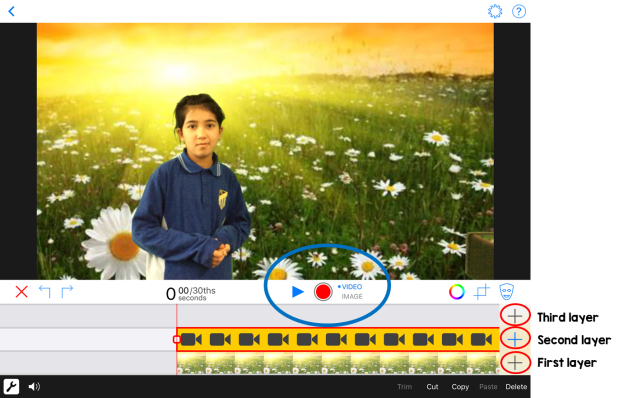
1. Change the option from ‘video’ to ‘image’ (it’s circled in blue).
2. First layer- add a background image e.g. a photo of the pyramids.
3. Second layer- use the camera to take a photo of the students in front of the Green Screen. Just simply press the circle (that’s currently red in this image).
Examples:
![IMG_0169[1]](https://techwithmisshalil.com/wp-content/uploads/2016/08/img_01691.jpg?w=620)
![IMG_0277[1]](https://techwithmisshalil.com/wp-content/uploads/2016/08/img_02771.jpg?w=620)
![IMG_0279[1]](https://techwithmisshalil.com/wp-content/uploads/2016/08/img_02791.jpg?w=620)
![IMG_0296[1]](https://techwithmisshalil.com/wp-content/uploads/2016/08/img_02961.jpg?w=620)
![IMG_0358[1]](https://techwithmisshalil.com/wp-content/uploads/2016/08/img_03581.jpg?w=620)
![IMG_0372[1]](https://techwithmisshalil.com/wp-content/uploads/2016/08/img_03721.jpg?w=620)
![IMG_0374[1]](https://techwithmisshalil.com/wp-content/uploads/2016/08/img_03741.jpg?w=620)
![IMG_0285[1]](https://techwithmisshalil.com/wp-content/uploads/2016/08/img_02851.jpg?w=620)
Miss Halil
 techwithmisshalil.com